Adding a Maskyoo API access token
As part of raising the information security level of the Maskyoo systems, API access includes an additional security measure in the form of an API TOKEN.
In addition to adding the allowed IP addresses for API access, the token that is defined in advance in the Maskyoo system is required as well.
Where to find the API TOKEN
The API TOKEN is available in the interface under:
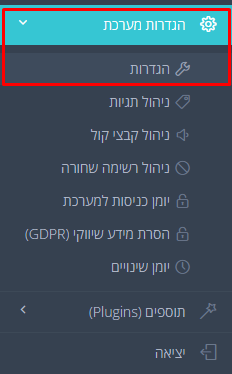
System Settings (הגדרות מערכת) ← Settings (הגדרות) ← the API Settings tab (הגדרות API) ← API access code (קוד גישה לממשקי API)
You may use the token that is displayed, or generate a new one by clicking Renew access code (חידוש קוד גישה).
Clicking Renew access code only fills the field with a new value — it does not save it. The token becomes effective only after the settings form is saved. If you leave the page without saving, the generated token does not become effective.

Prepare in advance for adding the token in your own code, and test immediately once it is applied.
System impact
The API token is the main access key for all integrations:
- REST API — when a token is defined for the account, every call to an endpoint requires it in the
Authorization: Bearerheader; without it (or when it is invalid / expired)401 Unauthorizedis returned. When no token is defined for the account, access is controlled by the allowed IP address list alone - SMS Gateway — sending and receiving SMS requires the same token as well (in the header or as a query parameter)
- SDK / Pixel — the client-side library identifies the account through
setting_api_key, which is based on the same token - IP whitelist — the token works only from IP addresses that were defined in advance under System Settings → API Settings
- Generating a new token — clicking Renew access code only fills the field; the token becomes effective only after the settings form is saved. Keep the token confidential; to replace a token contact Maskyoo support if needed